Yes, that's right, another program ending in "Cmd." This one provides functionality similar to the Unix backquote (`) operator. If you don't know what that does, look at the readme.txt file, included along with the program and its source code.
Here's the link: http://www.mediafire.com/?ygxlggxijma
Monday, June 30, 2008


Wednesday, February 20, 2008
Car hidden in vent?
Well I was wondering what it looks like in my vent, so I got out my digital camera, stuck it down in the vent, and took a picture (with the flash, of course!) What I got was certainly not what I was expecting:

Yes, that's right, there's a TOY CAR in the vent! As of now I still haven't retrieved it (I tried using both my bare hand and the vacuum cleaner) and in fact I think I may have even pushed it farther down. But I'm confident I'll get it sometime soon! ;)
But if you aren't the first owners of your house, especially if any of the previous owners had small children, you can be surprised at what you can find in your vents. I found what looks like another toy vehicle (but I can't really see what it is) and three little plastic people. Several years ago I also found some kind of orange thing with a picture of some character or something on it. But so far all I have managed to retrieve are the people (two I could get with my hands; the other one I needed the vacuum) and that orange thing.
But check your vents — you might find something!

Yes, that's right, there's a TOY CAR in the vent! As of now I still haven't retrieved it (I tried using both my bare hand and the vacuum cleaner) and in fact I think I may have even pushed it farther down. But I'm confident I'll get it sometime soon! ;)
But if you aren't the first owners of your house, especially if any of the previous owners had small children, you can be surprised at what you can find in your vents. I found what looks like another toy vehicle (but I can't really see what it is) and three little plastic people. Several years ago I also found some kind of orange thing with a picture of some character or something on it. But so far all I have managed to retrieve are the people (two I could get with my hands; the other one I needed the vacuum) and that orange thing.
But check your vents — you might find something!
Monday, February 11, 2008
Another download for you: Run with Parameters (RunCmd)
 From the readme.txt file:
[RunCmd] is a small open-source program I wrote to add a feature to Windows
that should have been there already. Have you ever wanted to run a
program with command line parameters using the GUI? Well then this is
the program for you!

Download it from MediaFire at http://www.mediafire.com/?4wgdkjjlihw, or from Softpedia using the button below!

Aperture Science desktop theme for Windows XP

I created an Aperture Science desktop theme. For those of you who don't know, it is from a game called Portal. You can look at readme.txt in the file for more information.
Download it here: http://www.mediafire.com/?31ni1uihm0w
Saturday, December 15, 2007
Transparency checkerboard bookmarklet
Okay, so I haven't actually written a post in a while (i.e. not just had Digg generate one for me.) Well hold your horses! I'm still posting!
Now you know when you edit images in Photoshop, Paint Shop Pro, or (my favorite) Paint.NET, you see that gray and white checkerboard wherever there is transparency? Do you ever wish you had that in your web browser (especially when viewing images as pages?) Have you been looking for something that can add that? Well look no further, as I have bookmarklets (small pieces of code you can bookmark and execute on a whim) that can do that.
Simply drag one of these links onto your Bookmarks toolbar(or your Links bar, dare I say it):
Now you know when you edit images in Photoshop, Paint Shop Pro, or (my favorite) Paint.NET, you see that gray and white checkerboard wherever there is transparency? Do you ever wish you had that in your web browser (especially when viewing images as pages?) Have you been looking for something that can add that? Well look no further, as I have bookmarklets (small pieces of code you can bookmark and execute on a whim) that can do that.
Simply drag one of these links onto your Bookmarks toolbar
- Checkerboard (gray/white)
- Checkerboard (high-contrast) (black/white)
Tuesday, May 29, 2007
Firefox toolbar removal
For quite a while, I have been wondering how to delete a custom toolbar from Firefox. I finally figured it out, and I am going to tell you just in case you have been wondering as well. It's actually pretty simple, but unintuitive. All that you have to do is remove all of the buttons from it. It won't disappear immediately, but it will after you hit OK. How do you remove buttons, you ask? Simply open the Customize Toolbar dialog (you should know how to open this...after all, how would you have created the toolbar?) and drag the button to the dialog. To remove the toolbar, repeat this for all of the buttons. Wait, do you want an empty toolbar to use as a separator or something? Well simply add a space to it. Yes, you must also remove all spaces/flexispaces/separators to remove the toolbar. Well, that's really all there is to it.
Saturday, April 21, 2007
Wii countdown clock

If you've ever been to Gamestop or EBGames shortly before the Wii was released, you have probably seen that big blue clock on the wall. It says "Experience Wii" on it in white text, and counts down to the Wii release date.
Well I was curious who owned it (Gamestop or Nintendo?) so today I called Gamestop. I already have a Wii, so I didn't ask if they had one of those in stock. But I asked who owned the clock. They said they received it from Nintendo, and that Nintendo didn't seem to want it back. So I asked where it was. It was in the back of the store. He then asked me something that I loved hearing: "Do you want it?" I then said yes. He asked me for my name, which I answered. He then said to be there by 4:00 PM. So I went to Gamestop and asked the guy I called for the clock. I told him my name, and he then replied, "You're the one!" He then went into the employees-only section and came out with the clock. I thanked him and went home with it. Now the owner is neither Gamestop nor Nintendo - it's me.
EDIT: I just found on the Internet that someone else got one as well. You can see it at http://revver.com/video/106925/bento-gets-the-wii-countdown-clock/.
Friday, April 06, 2007
Newspaper reference
That concert was featured in the newspaper, and it made reference to me. It didn't reference me by name, but it was definitely referring to me. It errs, however, by saying I am a preteen. I am 13 at the time of writing and at the time of the concert. I can't post the image right here 'cause it's in TIFF format. However, you can download it at http://www.mediafire.com/?02gqdrj00qi.
BTW, I recently dusted off my old UMAX Astra 2100U scanner and my brother gave me the idea to scan the article and post it. So I did! That was from The Washington Post, by the way. The article is also readable from their website at http://tinyurl.com/2u5xrk.
BTW, I recently dusted off my old UMAX Astra 2100U scanner and my brother gave me the idea to scan the article and post it. So I did! That was from The Washington Post, by the way. The article is also readable from their website at http://tinyurl.com/2u5xrk.
Wednesday, March 28, 2007
Concert
If you listen to the recording linked to in this post, please keep this in mind: I was 13 then, and I was very excited and nervous at the same time. Some of the things I said may seem out of place; in fact one thing in particular would probably make me come off as some snobbish asshole demanding attention. You'll know what part I mean when you hear it. Just trust me when I say it would make a lot more sense in context. Also, one more thing: my voice isn't nearly as high anymore.
Okay, so yesterday I went to a Nellie McKay concert with my family. I was really enjoying myself. Then my dad asked me if I wanted to request a song. I did, and she attempted to perform that song, but she was having trouble remembering most of the lyrics. By the way, the song was called The Big One, in case anyone is wondering.Then, she called me up to the stage. I gave out the address to this blog, because hey, free publicity. She asked me to sing the song I requested while she played. I tried, but I couldn't remember all the lyrics either. We eventually just gave up. It was funny. Then she played another song and had me dance with some girl in the audience who was celebrating her birthday. She's not my girlfriend or anything, in fact I didn't even know her, but I figured why not.
That's about all I can remember, but it was fun. Needless to say, I was feeling pretty weird up there, because I just wasn't used to being called up on stage in a concert.
EDIT: I now have an audio file of my part of the concert, courtesy of NPR. Download it at http://www.mediafire.com/?cztmxyrrgzz.
Nellie McKay, if you see this post, which is quite unlikely now considering this was more than 5 years ago, please email me at flarn2006@gmail.com.
Sunday, March 04, 2007
Backing Up TI-83 Plus RAM
Have you ever wanted to back up the RAM on your TI-83 Plus without a computer? Well it's possible. This video will explain how.
Wednesday, February 07, 2007
Dell's 17-inchers packing a jolt?
Dell's 17-inch laptops have been reported to send out 19-65V of energy through its screws!
read more | digg story
read more | digg story
Saturday, February 03, 2007
Random Characters

Here is a simple program I wrote. It is called Random Characters. It generates random characters. (Surprise surprise!) I have put a screenshot of it in this post.
The program is in the public domain, so you can download it for free. You guessed it: MediaFire. Download it at http://www.mediafire.com/?5m2mgmtizul.
Wednesday, January 31, 2007
Save MP3s in Sound Recorder
Does Windows XP come with software to create MP3s? The answer is an obvious NO! Or is it? Yes, it does. Sound Recorder actually has a hidden ability to save in MP3 format. Go to http://www.mediafire.com/?1tlinumm2nh and download the MP3 file there. Believe it or not, it originated as a WAV file which was then converted using Sound Recorder. By the way, if it sounds familiar, play the video on the last post! Hmm...that's just about it...oh yeah! I've got to tell you how! I hate it when people don't...
- Open Sound Recorder.
- Record or open the sound to save as MP3.
- Click File>Save.
- Just saving it with the MP3 extension won't work. We have to save it as an MP3 file. See where it says Format and it has that PCM thing? Click on Change... next to it, and a window will appear.
- Open the Format list, and click on MPEG Layer-3. This is what MP3 is short for!
- Click OK and then save it with the MP3 extension. But put the entire filename (including the extension) in quotes so that it will actually be called, say, music.mp3, rather than music.mp3.wav.
Monday, January 29, 2007
Sonic Advance gray boxes glitch
At first I wasn't sure which blog to post it to. Then I realized it's not necessarily a test mode so I decided to post it to the main blog. I discovered this in Visual Boy Advance. From the description:
This is a memory hack for Sonic Advance. Open a Sonic Advance ROM in Visual Boy Advance and then go to Tools and Memory Editor. Go to 00000214 and change it from 0002 to 00FF. Then click on the emulator window and it will be black. Go back to the memory editor and change it back to 0002. Click on the emulator window and it might say something like "Unsupported ARM mode 18" and then this will happen when you click OK.
EDIT: I have decided to host the savestate of the gray boxes glitch and link to the rom:
- Get the savestate from: http://www.mediafire.com/upload_complete.php?id=oyomg5zwzqm
- Get the ROM from: http://www.emuv2.com/index.php?page=rom_dl&rid=1575
- Due to legal reasons, I cannot give you a MediaFire link for it.
Saturday, November 18, 2006
Virtual disk images in Windows XP
What you need:
filedisk /mount 0 c:\example.img x:
Replace the parameters like this:
Note that you will need to format the new drive. You can then access it like any other drive until you reboot.
- Windows XP (Either edition will work)
- FileDisk (free, http://www.acc.umu.se/~bosse/, direct link http://www.acc.umu.se/~bosse/filedisk.zip)
- A computer (duh)
- Download and install FileDisk from the website above.
- Open a command prompt (Start>Run>type cmd)
- Type the following text into the command prompt at C:\
filedisk /mount 0 c:\example.img x:
Replace the parameters like this:
- example.img >> Whatever you want the image file to be called
- 1000000000 >> The size of your drive
- 0 >> The filedisk drive ID (starts at 0, must be the lowest integer available)
- c:\example.img >> The name of your image (note: path must be specified even if in current directory)
- x: >> The drive letter (must not be in use) followed by a colon (:)
Note that you will need to format the new drive. You can then access it like any other drive until you reboot.
Sunday, November 12, 2006
MediaFire: The best file upload service
Now, when I say it's the best, you may think: "Well that's his opinion." Well I'm sure it will be your opinion too!
I quote from the site:
MediaFire is at http://www.mediafire.com, surprise, surprise. Check it out!
I quote from the site:
- 100% Free
- Unlimited File Size
- Unlimited Uploads
- No Sign Up Required
MediaFire is at http://www.mediafire.com, surprise, surprise. Check it out!
Saturday, November 11, 2006
Weird glitch on my camera!
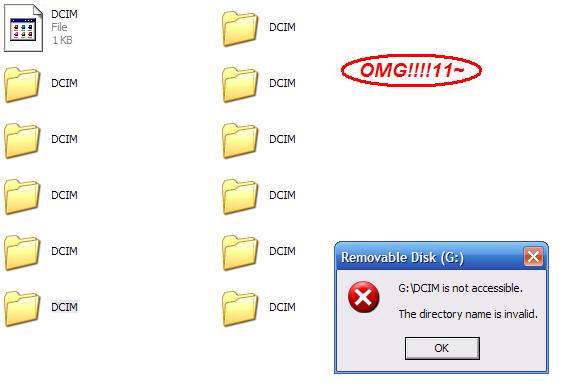
Yes, that's multiple folders (and a file, IMPOSSIBLE to delete without deleting all the folders as well :-S ) with the same name!
Basically I noticed that every time I turn on my camera a folder is created called DCIM if it doesn't exist. If it does exist, it doesn't create it. So I wondered: What if DCIM does exist...as a file rather than a folder? Well, I created a file called DCIM, and turned on my camera. I then turned it back off and reconnected the USB cable to find that that file was blank (it wasn't before) and there was not one, but TWO folders called DCIM. Opening one gave the following error:
G:\DCIM is not accessible.
The directory name is invalid.
Weird...
Each time I unplug it and plug it back in again it gives me two more folders called DCIM! In case you don't know (you probably do) no two folders or files in the same folder can have the same name, and neither can a file and a folder have the same name. The camera somehow broke that rule
Friday, November 10, 2006
VistaQuest VQ1005
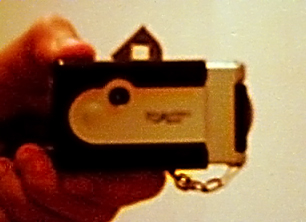
A while back I went to my local Wal*Mart and I saw a shelf of small keychain digital cameras there. Not thinking I could afford one, and purely out of curiosity, I looked at the price tag expecting it to be from $50-$100 or so. However, to my surprise, it read $19.96. I could afford it after all!
I purchased it and went home to try it out. It connects via USB, supports SD memory, and can also take short videos without audio. However, the downside is there is no picture-viewing display, there is no flash, and the battery runs out fairly quickly. Also there is a maximum of 40 seconds for each video clip.
In the long run however it is a pretty good camera, and I suggest you buy one. As you can tell from the title of this post, it's called the VistaQuest VQ1005.
Saturday, November 04, 2006
Eval.c mod for dc
Have you ever heard of dc? No, not Washington, DC! I'm talking about the RPN (reverse Polish notation) based calculator program for UNIX. It's open source, so therefore you can mod it. Well, I added a little extra feature into it: a clear-screen function. Whenever you type j as a command, it will clear the screen!
Download it at: http://www.paste-it.net/505/c
To use this mod, replace the contents of dc/eval.c in your bc (another calculator program that dc comes with) source directory with that code. Oh, and then recompile and move the new copy of dc created to your /usr/bin directory.
Download it at: http://www.paste-it.net/505/c
To use this mod, replace the contents of dc/eval.c in your bc (another calculator program that dc comes with) source directory with that code. Oh, and then recompile and move the new copy of dc created to your /usr/bin directory.
Tuesday, October 31, 2006
Route 666
I've had this photo for a while, and finally decided to share it with you. It is of a sign on Monroe St. in Herndon, VA:

Look at the number on the top. Yes, you read correctly, it says 666, the Number of the Beast. I'm neither superstitious nor Christian however, so I don't believe in any of that stuff, but still, it's kind of funny! There's also something ironic about it: there is a church on that street. Oh, the irony! :-) lol

Look at the number on the top. Yes, you read correctly, it says 666, the Number of the Beast. I'm neither superstitious nor Christian however, so I don't believe in any of that stuff, but still, it's kind of funny! There's also something ironic about it: there is a church on that street. Oh, the irony! :-) lol
Subscribe to:
Posts (Atom)